Developer Guide
About FindMyIntern
FindMyIntern is a desktop application designed to help students keep track of their internship applications. It allows students to:
- Consolidate all these applications into a single place
- Manage these applications
- Visualise their application statuses
The use of this Developer Guide is to document how FindMyIntern is designed and developed to provide insights for developers on the design considerations made for each feature. In addition, it provides a macro and micro overview of the architecture of FindMyIntern to guide new developers to navigate through the code base.
Table of Contents
- About FindMyIntern
- Acknowledgements
- Setting up, getting started
- Design
- Implementation
- Documentation, logging, testing, configuration, dev-ops
- Appendix: Requirements
- Appendix: Instructions for manual testing
Acknowledgements
Third-party libraries and licenses are listed here.
Bootstrap 5
Used in User Guide and Developer Guide.
Bootstrap 5.2 license: https://getbootstrap.com/docs/5.2/about/license/
IBM Plex Sans
Font by IBM, used as typeface in FindMyIntern.
IBM Plex Sans Open Font License: https://github.com/IBM/plex/blob/master/LICENSE.txt
Setting up, getting started
Refer to the guide Setting up and getting started.
Design
 Tip: The
 .puml files used to create diagrams in this document can be found in the diagrams folder. Refer to the PlantUML Tutorial at se-edu/guides to learn how to create and edit diagrams.
Architecture
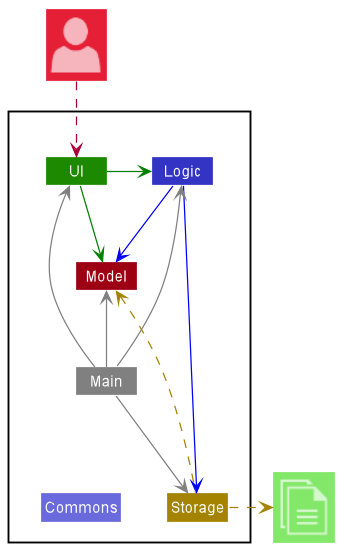
The Architecture Diagram given above explains the high-level design of the App.
Given below is a quick overview of main components and how they interact with each other.
Main components of the architecture
Main has two classes called Main and MainApp. It is responsible for,
- At app launch: Initializes the components in the correct sequence, and connects them up with each other.
- At shut down: Shuts down the components and invokes cleanup methods where necessary.
Commons represents a collection of classes used by multiple other components.
The rest of the App consists of four components.
-
UI: The UI of the App. -
Logic: The command executor. -
Model: Holds the data of the App in memory. -
Storage: Reads data from, and writes data to, the hard disk.
How the architecture components interact with each other
The Sequence Diagram below shows how the components interact with each other for the scenario where the user issues the command delete 1.
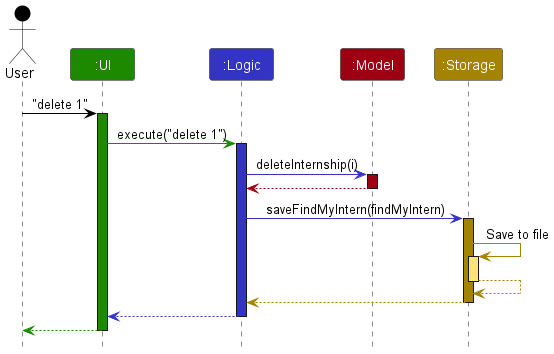
Each of the four main components (also shown in the diagram above),
- defines its API in an
interfacewith the same name as the Component. - implements its functionality using a concrete
{Component Name}Managerclass (which follows the corresponding APIinterfacementioned in the previous point.
For example, the Logic component defines its API in the Logic.java interface and implements its functionality using the LogicManager.java class which follows the Logic interface. Other components interact with a given component through its interface rather than the concrete class (reason: to prevent outside component’s being coupled to the implementation of a component), as illustrated in the (partial) class diagram below.
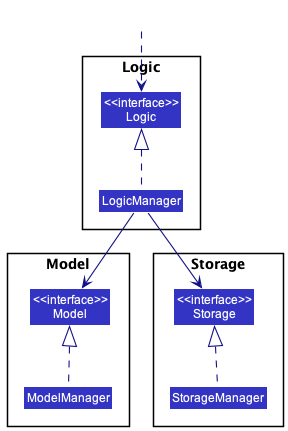
The sections below give more details of each component.
UI component
The API of this component is specified in Ui.java
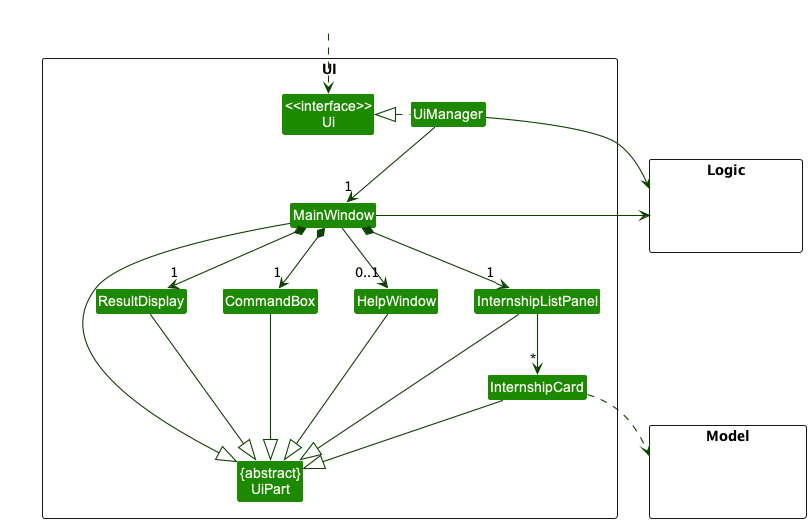
The UI consists of a MainWindow that is made up of parts e.g.CommandBox, ResultDisplay, InternshipListPanel, etc. All these, including the MainWindow, inherit from the abstract UiPart class which captures the commonalities between classes that represent parts of the visible GUI.
The UI component uses the JavaFx UI framework. The layout of these UI parts are defined in matching .fxml files that are in the src/main/resources/view folder. For example, the layout of the MainWindow is specified in MainWindow.fxml
The UI component,
- executes user commands using the
Logiccomponent. - listens for changes to
Modeldata so that the UI can be updated with the modified data. - keeps a reference to the
Logiccomponent, because theUIrelies on theLogicto execute commands. - depends on some classes in the
Modelcomponent, as it displaysInternshipobject residing in theModel.
Logic component
API : Logic.java
Here’s a (partial) class diagram of the Logic component:
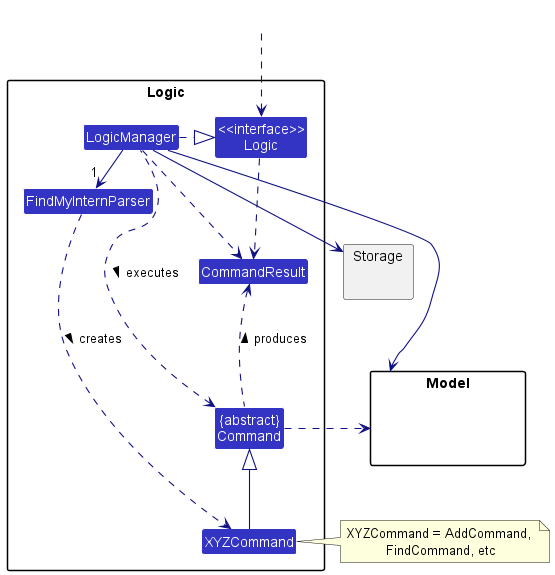
How the Logic component works:
- When
Logicis called upon to execute a command, it uses theFindMyInternParserclass to parse the user command. - This results in a
Commandobject (more precisely, an object of one of its subclasses e.g.,AddCommand) which is executed by theLogicManager. - The command can communicate with the
Modelwhen it is executed (e.g. to add an internship). - The result of the command execution is encapsulated as a
CommandResultobject which is returned back fromLogic.
The Sequence Diagram below illustrates the interactions within the Logic component for the execute("delete 1") API call.
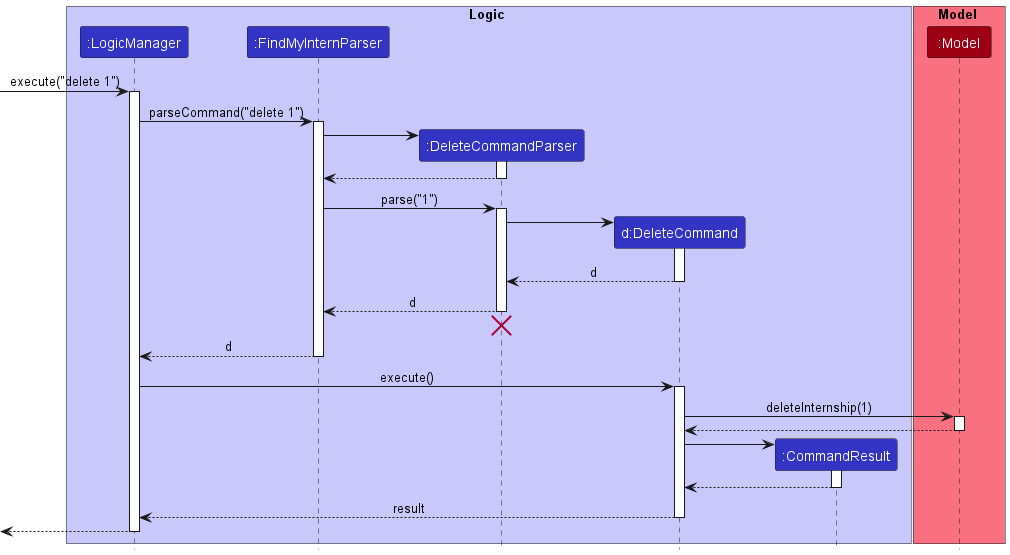
 Note: The lifeline for
 DeleteCommandParser should end at the destroy marker (X) but due to a limitation of PlantUML, the lifeline reaches the end of diagram.
Here are the other classes in Logic (omitted from the class diagram above) that are used for parsing a user command:
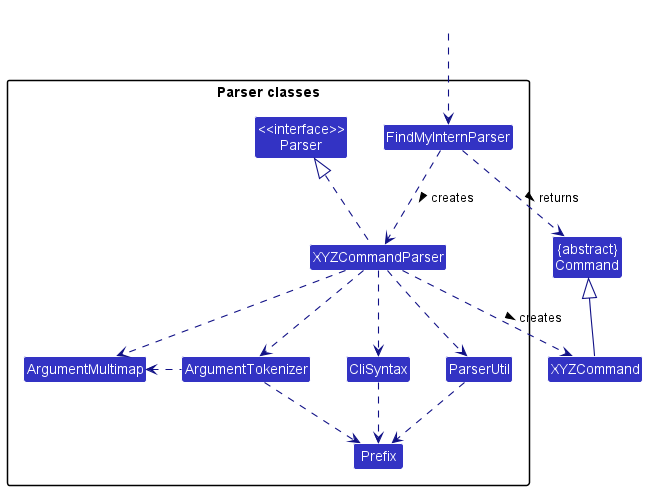
How the parsing works:
- When called upon to parse a user command, the
FindMyInternParserclass creates anXYZCommandParser(XYZis a placeholder for the specific command name e.g.,AddCommandParser) which uses the other classes shown above to parse the user command and create aXYZCommandobject (e.g.,AddCommand) which theFindMyInternParserreturns back as aCommandobject. - All
XYZCommandParserclasses (e.g.,AddCommandParser,DeleteCommandParser, …) inherit from theParserinterface so that they can be treated similarly where possible e.g, during testing.
Model component
API : Model.java
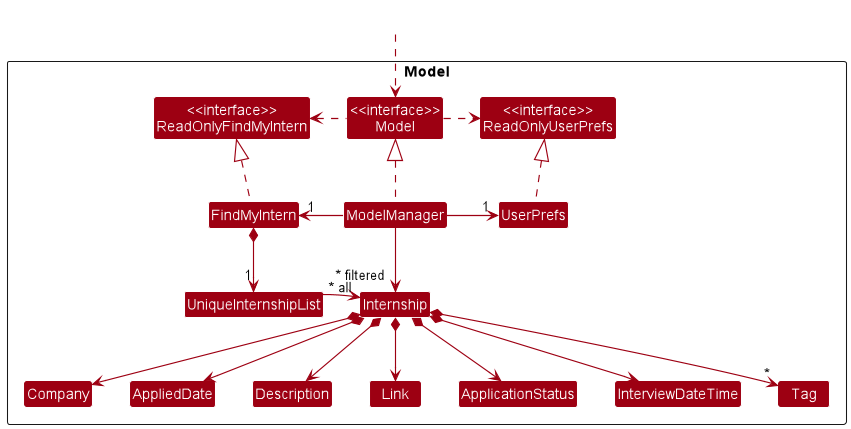
The Model component,
- stores the findMyIntern data i.e., all
Internshipobjects (which are contained in aUniqueInternshipListobject). - stores the currently ‘selected’
Internshipobjects (e.g., results of a search query) as a separate filtered list which is exposed to outsiders as an unmodifiableObservableList<Internship>that can be ‘observed’ e.g. the UI can be bound to this list so that the UI automatically updates when the data in the list change. - stores a
UserPrefobject that represents the user’s preferences. This is exposed to the outside as aReadOnlyUserPrefobjects. - does not depend on any of the other three components (as the
Modelrepresents data entities of the domain, they should make sense on their own without depending on other components)
Note: An alternative (arguably, a more OOP) model is given below. It has a Tag list in the FindMyIntern, which Internship references. This allows FindMyIntern to only require one Tag object per unique tag, instead of each Internship needing their own Tag objects.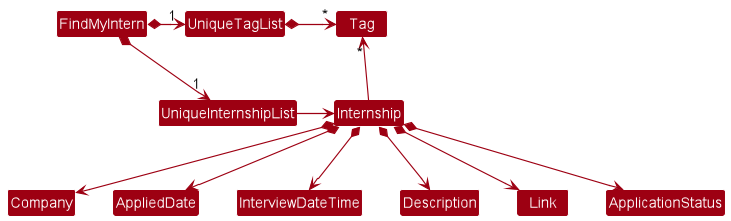
Storage component
API : Storage.java
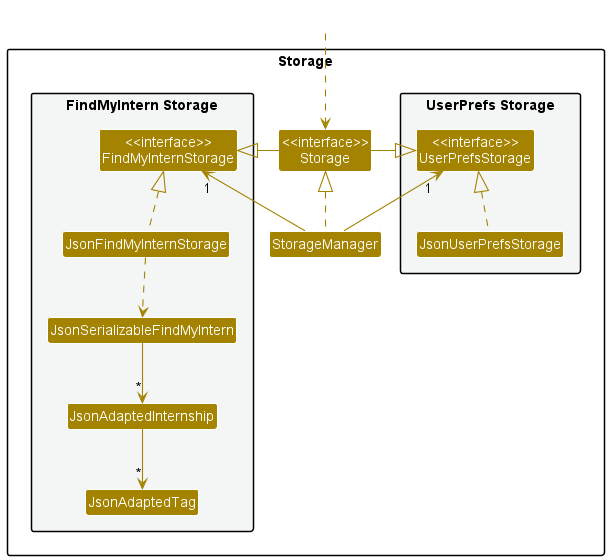
The Storage component,
- can save both FindMyIntern data and user preference data in json format, and read them back into corresponding objects.
- inherits from both
FindMyInternStorageandUserPrefStorage, which means it can be treated as either one (if only the functionality of only one is needed). - depends on some classes in the
Modelcomponent (because theStoragecomponent’s job is to save/retrieve objects that belong to theModel)
Common classes
Classes used by multiple components are in the seedu.addressbook.commons package.
Implementation
This section describes some noteworthy details on how certain features are implemented.
Add Internship feature
Implementation
- An
AddCommandParserclass is created, which parses the user input by splitting the input by its prefixes, then returns the relevantAddCommand. -
AddCommandtakes in anInternship. -
Internshipholds the details of theInternshipthat the user wants to add.
When execute of AddCommand is run, the Internship is passed into the model to be added to the Internship list.
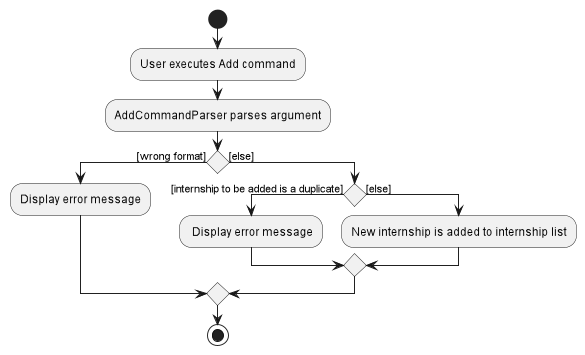
The following activity diagram summarizes what happens when a user executes an add command:
Design Considerations
-
Adding of internships with same company name:
-
Alternative 1: Do not allow internships with same company name
- Pros: Only need to check for duplicate company names
- Cons: Do not allow multiple internships with the same company, even if the applications are for different roles
-
Alternative 2 (current choice): Allow internships with same company name if they have different tags
- Pros: Allow multiple internships with the same company
- Cons: Need to check for both duplicate company names and duplicate tags
-
Alternative 1: Do not allow internships with same company name
Find Internships from keywords
Implementation
-
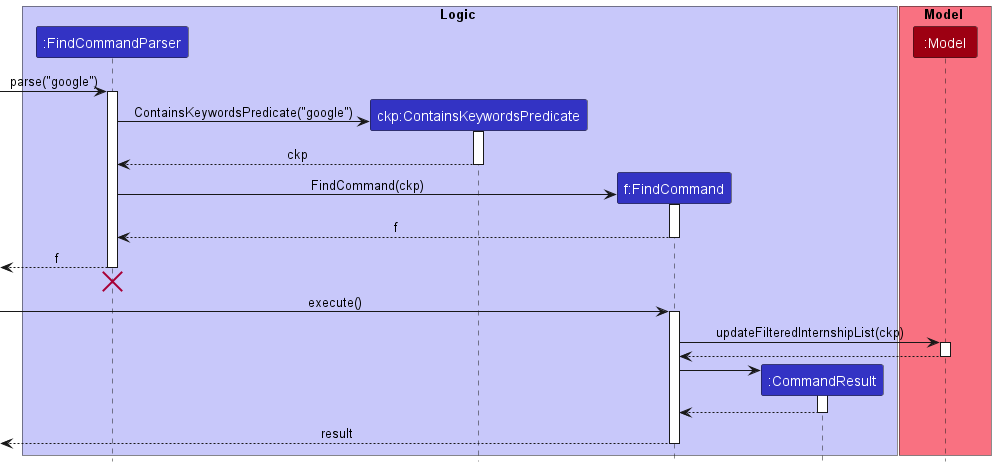
FindCommandParserparses the user input by splitting the input by whitespaces. - The parsed user input, also known as keywords, are then passed to the predicate
ContainsKeywordsPredicate. -
FindCommandthen takes in theContainsKeywordsPredicatecontaining the keywords. - When
FindCommand#execute(model)is called, it updates the given model to theInternshiplist where theCompanyorTagmatches the keywords.
The Sequence Diagram below illustrates the interactions within the Logic component as explained above.
Design Considerations
- Allowing for multiple keywords to show more than 1 specific internship in list
-
Components of
Internshipto be matched-
Alternative 1: Match all components of
Internship, e.g.Description,Link,Company, etc.- Pros: Better search capability
- Cons: Less specific internship list
-
Alternative 2 (current choice): Only allow for matching of
CompanyandTag- Pros: More logical search (A typical search would consist of roles or company name)
- Cons: May not be what users want to search
-
Alternative 1: Match all components of
-
Matching of keywords:
-
Alternative 1: Only allows full word match
- Pros: More specific internship list
- Cons: Require typing full name of company or tag
-
Alternative 2 (current choice): Allows partial word match
- Pros: Allow quick searching for company or tag
- Cons: Less specific internship list
-
Alternative 1: Only allows full word match
Filter by ApplicationStatus feature
What it does
The filter by ApplicationStatus feature allows users to filter internship applications according to specific application statuses.
The command format is filter APPLICATION_STATUS, where filter is the command and APPLICATION_STATUS is either applied, shortlisted, interviewed, accepted, or rejected.
Implementation
There are some similarities between how the filter feature and the find feature were implemented.
- The filter feature makes use of
FilterCommand,FilterCommandParser,ApplicationStatus, andInternshipHasApplicationStatusPredicate.-
InternshipHasApplicationStatusPredicateimplementsPredicate<Internship>, and holds theApplicationStatusthat the user is filtering for.
-
- It also calls
Model#updateFilteredInternshipList(Predicate<Internship>)which filters theInternshiplist with the user-specifiedApplicationStatus.
Command execution
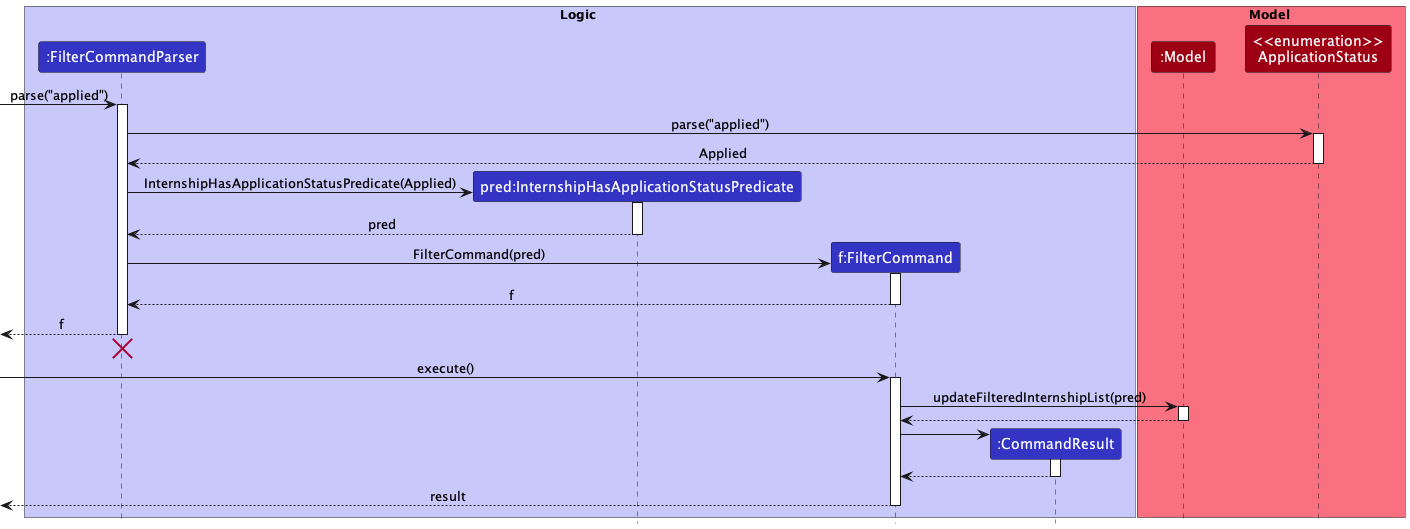
- User enters filter command with valid application status.
-
FindMyInternParserparses the input and creates aFilterCommandParserobject. -
FilterCommandParserparses the input by passing it toApplicationStatus. - A new
InternshipHasApplicationStatusPredicateobject is created from the returnedApplicationStatus. -
FilterCommandParsercreates a newFilterCommandobject which accepts theInternshipHasApplicationStatusPredicateobject. - When
FilterCommand#execute(model)is run, it updates the model with theInternshipHasApplicationStatusPredicateand filters theInternshiplist with the user-specified application status.
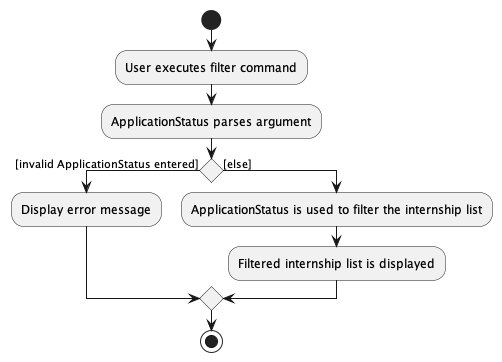
The following activity diagram summarizes what happens when a user executes a filter command:
The sequence diagram below illustrates the interactions within the Logic component as explained above.
Design Considerations
- The implementation is similar to
FindCommandas both have the same idea of filtering/finding something in the list. - The model already supports filtering for a certain predicate, therefore it is only intuitive that
FilterCommandwould make use of this functionality, just like howFindCommandwould. - This implementation would allow easy extension should there be more
ApplicationStatusadded, since parsing of user input is done byApplicationStatus. - The
filtercommand does not requirePREFIX_APPPLICATION_STATUS(s/).- This is in contrast to
markcommand which requires and takes in bothIndexandApplicationStatus, and therefore requires thePREFIX_APPLICATION_STATUSto correctly parse input. - While having
PREFIX_APPPLICATION_STATUSwould be more consistent, it is redundant and unintuitive since the command only takes in one input,ApplicationStatus.
- This is in contrast to
Edit Internship feature
Implementation
- An
EditCommandParserobject is created, which parses the user input by splitting the input by the prefix of each field inInternship, then returns the relevantEditCommand. -
EditCommandtakes in anindexand at least one ofInternship’s fields.
When execute of EditCommand is run, a new Internship object with the updated fields is created.
- The new
Internshipis passed into the model to be updated.
The following activity diagram summarizes what happens when a user executes an edit command.
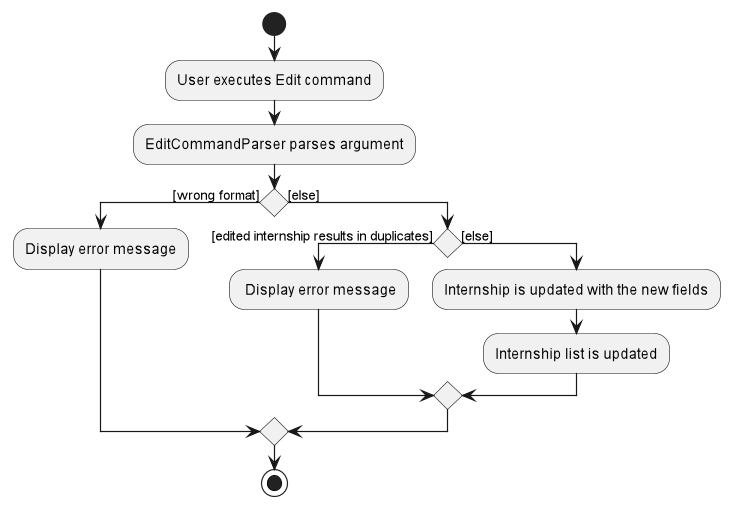
Design Considerations
- The fields passed in are optional, but at least one must be provided.
Mark Internship feature
Implementation
MarkCommand was implemented similar to how EditCommand was implemented.
- A
MarkCommandParserobject is created, which parses the user input by splitting the input byPREFIX_APPLICATION_STATUS, then returns the relevantMarkCommand. -
MarkCommandtakes in anindexandapplicationStatus. - When
executeofMarkCommandis run, a newInternshipobject with the updatedapplicationStatusis created, with all other fields unchanged. - The new
Internshipis passed into the model to be updated.
The following activity diagram summarizes what happens when a user executes a mark command.
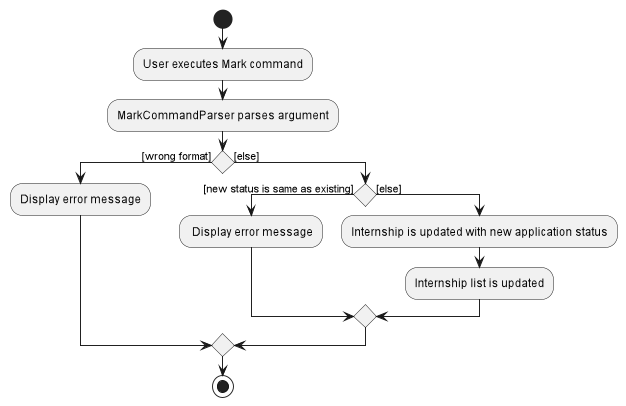
Design Considerations
- The new
applicationStatusmust be different from the existing one for it to be updated. -
Types of
applicationStatus:-
Alternative 1: Allow any user input as
applicationStatus- Pros: Variation of
applicationStatusis not limited - Cons: Impossible to implement filter by
ApplicationStatusfeature
- Pros: Variation of
-
Alternative 2 (current choice): Have a fixed set of
applicationStatusthat can be passed in- Pros: Allow easy filtering by
ApplicationStatus - Cons: Fixed variation of
applicationStatus
- Pros: Allow easy filtering by
-
Alternative 1: Allow any user input as
Sort Internships feature
Implementation
-
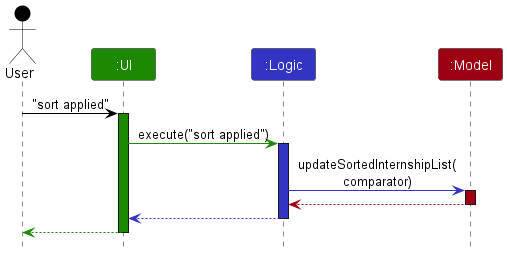
ModelManagerprovides aFilteredListthat is stored as anObservableList.InternshipListPanelstores thisObservableListto display the list of internship applications to the user. - In order to sort the list of applications, we wrap the
FilteredListas aSortedListinModelManagerbefore returning it as theObservableList. - This allows ModelManager to accept a
Comparatorusing the methodupdateSortedInternshipListand update theComparatorof theSortedList. - The
SortedListwill then be sorted according to theComparatorprovided and theObservableListwill display the internship applications in the sorted order.
The following sequence diagram illustrates how the list is updated when the user enters the sort applied command:
Design Considerations
- Display internships from the latest date to the earliest date to easily refer to recent applications
-
Storing the list of internship applications:
-
Alternative 1: Update the stored internship list according to the sort criteria
- Pros: Easily view in sorted order without having to re-type sort command
- Cons: Not able to view original order once sorted
-
Alternative 2 (current choice): Maintain the stored list according to the order it was added by user
- Pros: Allow user to view internship applications in the original order it was added
- Cons: Have to re-enter the sort command when the reopens the application
-
Alternative 1: Update the stored internship list according to the sort criteria
Documentation, logging, testing, configuration, dev-ops
Appendix: Requirements
Product scope
Target user profile:
- has a need to manage a significant number of internship applications
- prefer desktop apps over other types
- can type fast
- prefers typing to mouse interactions
- is reasonably comfortable using CLI apps
Value proposition: convenient and user-friendly app to manage and keep track of internship applications
User stories
Priorities: High (must have) - * * *, Medium (nice to have) - * *, Low (unlikely to have) - *
| Priority | As a … | I want to … | So that I can… |
|---|---|---|---|
* * * |
new user | utilise the help function | see the instructions on how to use the app |
* * * |
busy user | add internship applications quickly using CLI | have more time for other things |
* * * |
user | mark the internship as rejected, interviewed, applied or rejected | know the status of the internship application |
* * * |
user | edit an internship application | update the details of an internship application |
* * * |
user | automatically save any edits made | save edits even if I accidentally close the app |
* * * |
user | delete a specific internship application | delete an individual application if I accidentally made a mistake |
* * |
user | add a short description of the internship | know what the role is about |
* * |
busy user | view the interview date of each internship application | better manage my time and prepare accordingly |
* * |
user | add the link of the internship posting | refer to the internship posting when preparing for interview |
* * |
lazy user | search for a specific internship using keywords | get matching results more quickly |
* * |
user | filter the internships that I have applied to by application status | easily view the statuses of my applications |
* * |
user | sort the internships based on a sort criteria (applied date or interview date) | easily view my applications from latest date to earliest date |
* * |
user | clear all internship applications | focus on my applications for a new internship application period |
Use cases
(For all use cases below, the System is FindMyIntern and the Actor is the user unless specified otherwise)
Use Case: UC1 - Add internship application
MSS:
- User requests to add an internship application.
- User enters the details for the internship application.
-
FindMyIntern creates the new internship application.
Use case ends.
Extensions:
- 2a. User enters the details in the wrong format.
-
2a1. FindMyIntern shows an error message.
Use case ends.
-
- 2b. Details entered match an existing internship.
-
2b1. FindMyIntern shows an error message.
Use case ends.
-
Use Case: UC2 - Edit internship application
MSS:
- User requests to edit an internship application.
- User enters the changes to be made.
-
FindMyIntern updates the details of the internship application.
Use case ends.
Extensions:
- 2a. User enters an invalid index.
-
2a1. FindMyIntern shows an error message.
Use case ends.
-
- 2b. User enters the details in the wrong format.
-
2b1. FindMyIntern shows an error message.
Use case ends.
-
Use Case: UC3 - Mark application status of internship application
Similar to use case 2 except the changes to be made is restricted to application status.
Use Case: UC4 - Find internship applications using keywords
MSS:
- User requests to find internship applications stored in the FindMyIntern.
- User enters the keywords for the search.
-
FindMyIntern shows a list of internship applications that match the keywords.
Use case ends.
Extensions:
- 2a. User enters the details in the wrong format.
-
2a1. FindMyIntern shows an error message.
Use case ends.
-
- 3a. There were no internship applications that matched the keywords.
-
3a1. FindMyIntern shows an empty list.
Use case ends.
-
Use Case: UC5 - Filter internship applications by application status
Similar to use case 4 except that the filtering is done by application status instead of keywords.
Use Case: UC6 - Sort internship applications by sort criteria
MSS:
- User requests to sort internship applications by sort criteria.
- User enters the desired sort criteria (applied or interview).
-
FindMyIntern shows a list of internship applications sorted by the desired sort criteria.
Use case ends.
Extensions:
- 2a. User enters the details in the wrong format.
-
2a1. FindMyIntern shows an error message.
Use case ends.
-
- 3a. There were no internship applications that could be sorted by the sort criteria (interview).
-
3a1. FindMyIntern shows the list of internship applications in the original order.
Use case ends.
-
Use Case: UC7 - Delete a specific internship application
MSS:
- User wants to delete a specific internship application.
- User enters the desired internship application to remove.
-
FindMyIntern deletes the specific internship application.
Use case ends.
Extensions:
- 2a. User enters an invalid index.
-
2a1. FindMyIntern shows an error message.
Use case ends.
-
- 2b. User enters the details in the wrong format.
-
2a1. FindMyIntern shows an error message.
Use case ends.
-
Use Case: UC8 - Clear all internship applications
MSS:
- User wants to clear all internship applications.
- User enters the
clearcommand. -
FindMyIntern deletes all internship applications.
Use case ends.
Non-Functional Requirements
- Should work on any mainstream OS as long as it has Java
11or above installed. - Should be able to hold up to 1000 internship applications without a noticeable sluggishness in performance for typical usage.
- A user with above average typing speed for regular English text (i.e. not code, not system admin commands) should be able to accomplish most of the tasks faster using commands than using the mouse.
- Should be more efficient than a typical spreadsheet application.
- Should be easy to pick up for people who are not proficient with technology.
- Should be able to work without any internet connection.
Glossary
- Mainstream OS: Windows, Linux, Unix, OS-X
-
ApplicationStatus: Internship application status which is either
applied,shortlisted,interviewed,accepted, orrejected - GUI (Graphical User Interface): A system of interactive visual components for computer software for users to interact with.
- CLI (Command Line Interface): A text-based interface that communicate with users in the form of lines of text.
Appendix: Instructions for manual testing
Given below are instructions to test the app manually.
Note: These instructions only provide a starting point for testers to work on;
testers are expected to do more exploratory testing.
Launch and shutdown
-
Initial launch
-
Download the jar file and copy into an empty folder
-
Double-click the jar file
Expected: Shows the GUI with a set of sample internship applications. The window size may not be optimal.
-
-
Saving window preferences
-
Resize the window to an optimal size. Move the window to a different location. Close the window.
-
Re-launch the app by double-clicking the jar file.
Expected: The most recent window size and location is retained.
-
Deleting an internship
-
Deleting an internship while all internships are being shown
-
Prerequisites: List all internships using the
listcommand. Multiple internships in the list. -
Test case:
delete 1
Expected: First internship application is deleted from the list. Details of the deleted internship application shown in the status message. -
Test case:
delete 0
Expected: No internship application is deleted. Error details shown in the status message. -
Other incorrect delete commands to try:
delete,delete x,...(where x is larger than the list size)
Expected: Similar to previous.
-
Saving data
- Dealing with missing data files
- To simulate a missing data file, delete
findmyintern.jsonfrom thedatadirectory. - Run
findmyintern.jar.
Expected: The GUI gives the user the default sample data of internship applications. A newfindmyintern.jsonfile containing the sample data is created.
- To simulate a missing data file, delete
- Dealing with corrupted data files
- To simulate a corrupted data file, open
findmyintern.jsonin a text editor software and delete the first{. - Run
findmyintern.jar.
Expected: The GUI will show an empty list of internship applications. A new emptyfindmyintern.jsonfile is created.
- To simulate a corrupted data file, open